
Painless Applied Epic System Administration
Give the roles operating your Applied Epic workflows for agency-wide changes. Correct, adjust, and reassign thousands of records without one-by-one edits.
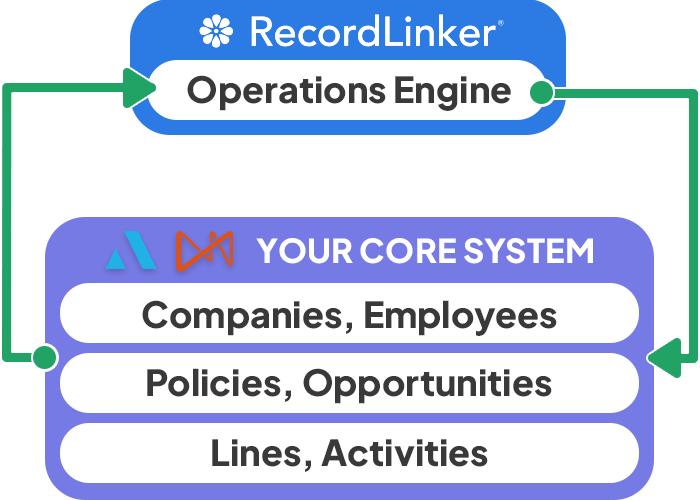
RecordLinker integrates with Applied Epic to handle the ongoing changes your operations generate: adding Employees, managing Company settings, updating Pr/Br Commissions, swapping Servicing Contacts, setting View Others permissions, and more. Done in just a single pass.
The Operators Behind Your Applied Epic
The people running your Epic don’t share one job title. They share the heavy, recurring work behind your operations.
You know some of them: Enterprise Administrator, Epic Administrator, Operations Manager, Agency Technology Specialist, Business Support Specialist, Application Support Specialist, Systems and Data Specialist, Business Application Analyst. Even Accounting Analysts deal with granular changes.
Their work happens record by record, one field at a time – times dozens of clicks it takes to reach just one field. It can take days to set up 50 new Employees, change 700 Profit Centers, or populate Est. Premium and Est. Commission values on 1200 lines that are missing from reporting.
RecordLinker equips your teams with workflows, tools, and templates that turn weeklong system labor into straightforward updates. Reusable, auditable, and made for volume.
Applied Certified Vendor Integration
RecordLinker securely syncs both ways with your Applied Epic. Your teams make changes through our workflows. Upon review and approval everything pushes back into your Epic in seconds.
It takes just few days for your agency to gain capacity for maintaining operational data at scale. RecordLinker is an official Applied Certified Integration Partner, we will handle the integration from start to finish for you..
Trusted by Top US P&C Insurance Brokers
We work with some of the industry best brokers, helping our clients speed up Data Conversion projects and Enterprise Administration tasks.
RecordLinker helps brokers handle data at scale in ways specific to their systems.














Multi-Record Workflows for Your Applied Epic
What used to require days of individual record creation and one-by-one updates now takes hours. Make edits across multiple records simultaneously, approve, and safely sync changes to your Applied Epic.
Common Use Cases for Applied Epic
RecordLinker turns manual click-by-click tasks of busy Application Analysts and Enterprise Admins into precise, structured workflows, making large-scale updates straightforward. We help agencies get savvy behind the scenes, regardless of scale.
Enhanced Workload Reassignments
When an employee retires or changes job, you may need to reassign the entire servicing contacts list for 200 clients and 1000 policy lines.
- Find and filter out clients and current/renewed policies by specific servicing contacts.
- Reassign the entire servicing team rather than member-by-member.
- Split your workload reassignments between several employees. See exactly what gets reassigned and how. Customize selected items.
Pr/Br Commissions
Pr/Br Commissions are tough to keep updated when hundreds of lines need changes. Make the grind go away with flexible edits across your book.
- Eliminate click-by-click navigation between accounts, policies, and individual lines. Change Pr/Br tabs in bulk.
-
Find your lines with filters for sweeping
accountchannges, or select by policytypes,numbers, andIDs. - Pick producers you want to change to. Only pick from a small, handy list you configure, and sync to your Epic.
Policy and Line-Level Operations
Whenever you need to change a field across 100s of lines, it means hours spent on navigation. Turn Enterprise Admins into power users instead!
-
Change fields like
ICO,Status,Profit Center,Agency Defined Categories, and many more. All in one go. - Define your list of policies or lines with handy include/exclude filters, or paste a list of IDs.
- Edit fields on an entire set from a single admin-first template. Preview changes, and sync to Epic.
Structure Groups Management
Changing structures in Applied Epic forces you to go through employees one-by-one. You can now centrally review and edit sets of structures!
-
Group your structures into sets of
Agency,Branch,Department, andProfit Center. Build and edit configurable groups. - Add or move hundreds of employees between structures in one go. Enforce the change with one click.
- Easily spot employees whose structure settings deviate from their assigned structure presets.
Employee Configuration
Need to add 200 new employees? Both adding and editing can take days to configure all the settings employee-by-employee and tab-by-tab. Let’s do it in an hour instead.
- Upload your list of new employees, or view, search, and select existing employees for changes.
- Generate quick templates to set or modify settings across multiple employees, or easily find specific settings in an interface organized for this purpose.
- Upload back to RecordLinker, check, edit individual flags, approve, and sync to Applied Epic.
View Others Tab
Every employee needs permissions to view task details of other employees. Within a team this means creating an entire matrix of permissions for each employee’s View Others.
- Compose the team you want to set View Others permissions for.
-
Generate a handy template file with a chart of relationships. Select who can view whom by
Tasks,Activities, andWorkflows. - Upload it back to RecordLinker, approve, and sync to your Applied Epic.
Tell Us Your Admin Challenge
Got a painful task that keeps your operations busy? Contact us to find out how RecordLinker can make your exact use case more efficient! Applied Epic is flexible, and lets us organize the settings you need.
Introduce us to your team – we get what they need daily!
Save Stress Managing Applied Epic Critical Data
Your System Support Teams Get The Tools They Need
You get a modern, compact UI that lets you manage different aspects of your Applied Epic records in a single view. Full focus without updating record-by-record, switching tabs, or looking for dropdowns and individual setting groups.
Ready for Bulk-Friendly Editing and Creation
Whenever you need to manage a set of users (or other entities), you can create new ones as well as reassign and edit parameters for existing system records. If you want to change email domain for 500 users, you can do that in one go. With our platform, admin capabilities get enhanced for scale, eliminating the need to navigate app UI and individual records.
RecordLinker's Workflows for Admins: Create, Edit, Approve, and Sync
Our workflow is simple and oriented at mitigating risk of a mistake. Create new or edit existing records, configuring their fields and flags in one view. Approve only when you are ready – or restore the settings for a specific record from your Applied Epic whenever you have second thoughts about your edits. Press a button to sync changes when ready.

How Busy Epic Enterprise Admins Feel About RecordLinker
- Zero click-by-click grind to make 100s of edits.
- Admin-first interface with bulk-change workflows.
- System-wide edits done in minutes.
- Less mistakes and omissions made.
- Previews and reversable changes.
- Quick onboarding and time to value.
RecordLinker Can Also Help Your Data Conversion Team
Do you regularly consolidate data from multiple Agency Management Systems or book imports?
Do you grow through multiple acquisitions a year?
RecordLinker is also a great tool to help you migrate acquired agency data into your Applied Epic!
Discover our capabilities for Applied Epic data conversion projects!